Dbs101_unit4
Unit IV: Intermediate and Advanced SQL – Let’s Make Databases Smarter!
Introduction
Welcome to Unit IV — the chapter where we level up from simply talking to databases, to making them think and react.
In the earlier units, we learned how to store and retrieve data. But now, it’s time to explore the brains behind the operation. Think of this unit as teaching your database kung fu — now it can defend itself, make decisions, and even yell when something changes. 💥
🔢 Lesson 9: Introduction to Number Systems
Before diving deep into the SQL matrix, we need to speak the language of machines: Number Systems.
🤔 What’s a Number System?
A number system is just a way to represent numbers using symbols. Humans love the decimal (base-10) system, but computers? They prefer simpler stuff — like binary.
| Number System | Base | Digits Used |
|---|---|---|
| Decimal | 10 | 0–9 |
| Binary | 2 | 0, 1 |
| Octal | 8 | 0–7 |
| Hexadecimal | 16 | 0–9, A–F |
💡 Fun Fact: The word “bit” comes from “binary digit”! It’s the smallest unit of data in a computer.
♻️ Decimal to Binary Conversion
To convert a decimal to binary:
- Divide the number by 2.
- Write down the remainder.
- Repeat until you hit 0.
- Read your remainders backwards.
Example: Convert 13 to binary
1
2
3
4
5
13 ÷ 2 = 6 R1
6 ÷ 2 = 3 R0
3 ÷ 2 = 1 R1
1 ÷ 2 = 0 R1
=> Binary: 1101
⬅️ Binary to Decimal Conversion
Each binary digit (bit) is multiplied by a power of 2, starting from the right.
Example: Convert 1101 to decimal
1
2
(1×2³) + (1×2²) + (0×2¹) + (1×2⁰)
= 8 + 4 + 0 + 1 = 13
➕ Binary Arithmetic (Math Time!)
Binary math isn’t so scary — just different.
| Operation | Result |
|---|---|
| 0 + 0 | 0 |
| 0 + 1 | 1 |
| 1 + 1 | 10 (carry 1) |
| 1 + 1 + 1 | 11 (carry 1) |
🚀 Fun Fact: Computers add in binary using circuits called “adders” built right into the CPU!
🚀 Lesson 10: Indexes, Authorization, and SQL Programming
⚡ Indexes — Making Data Zoom!
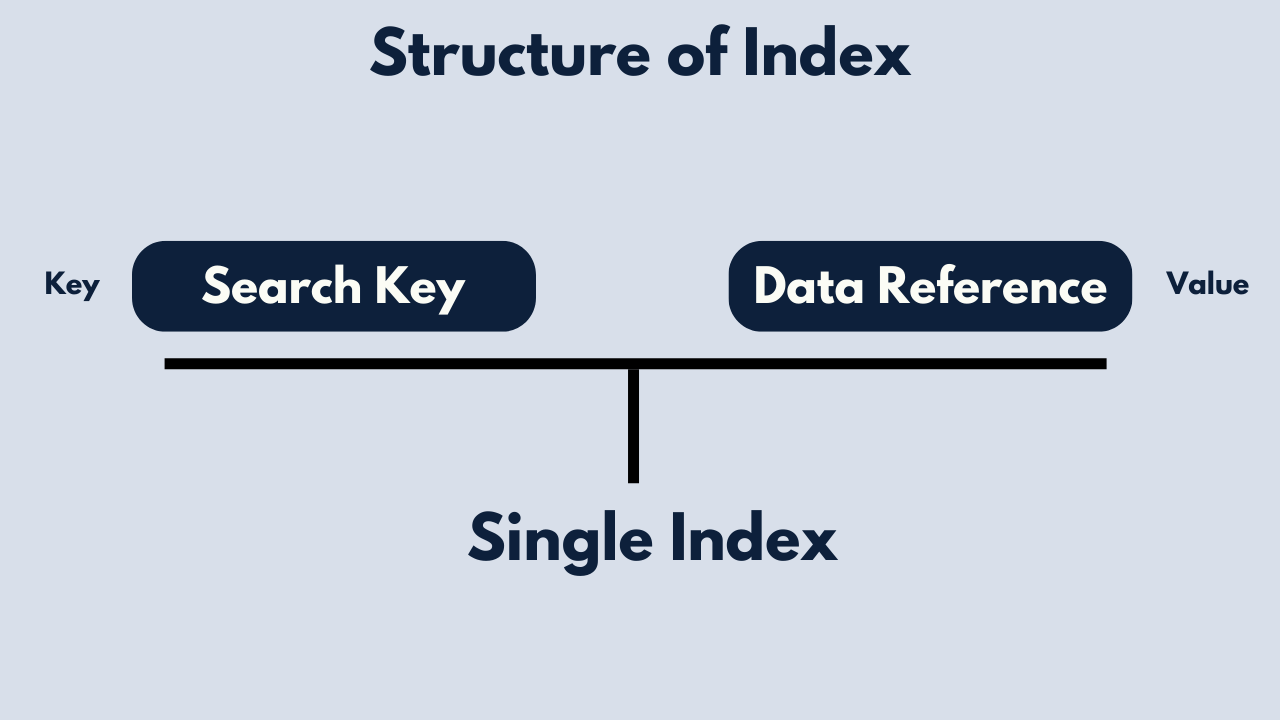
Imagine searching for a name in a huge list without an index — you’d scroll forever. That’s where indexes help.
They’re like bookmarks in a book: they don’t store the content, but they help you find things fast.
Create a basic index:
1
CREATE INDEX deptindex ON instructor (deptname);
Create a unique index (no duplicates allowed):
1
CREATE UNIQUE INDEX deptindex ON instructor (deptname);
Delete an index:
1
DROP INDEX index_name;
🔹 Pro Tip: Too many indexes can actually slow down writes! Use them wisely.
🔐 Authorization — SQL Security System
Not everyone should have keys to everything. SQL lets you control access with permissions (called privileges).
Types of permissions:
SELECT– Read dataINSERT– Add dataUPDATE– Modify dataDELETE– Remove dataEXECUTE– Run stored programs
Give access:
1
GRANT SELECT, INSERT ON students TO user1;
Take it back:
1
REVOKE INSERT ON students FROM user1;
Allow users to give access to others:
1
GRANT SELECT ON department TO user1 WITH GRANT OPTION;
You can also group permissions into roles and use views (custom lenses into data) to keep things even tighter.
💻 SQL + Programming Languages
SQL isn’t lonely — it loves company from programming languages.
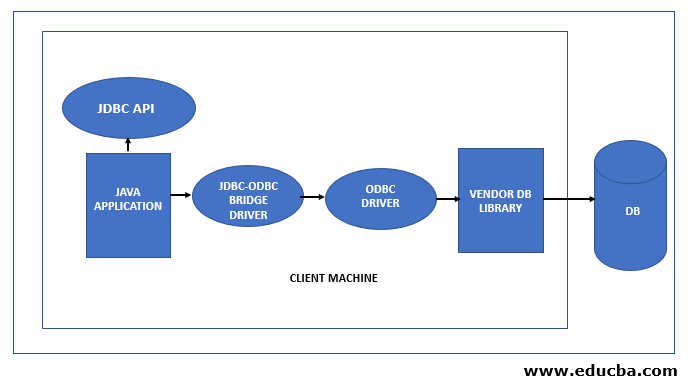
- Dynamic SQL: Build SQL statements on the fly (flexible, great for user-driven queries).
- Embedded SQL: Write SQL directly inside languages like C or Java.
Common APIs:
- JDBC (Java Database Connectivity)
- ODBC (Open Database Connectivity)
🎮 Fun Fact: The first embedded SQL standard was defined back in 1986!
Lesson 11: Functions, Procedures, and Triggers — SQL Magic!
🧹 Functions — Reusable Query Blocks
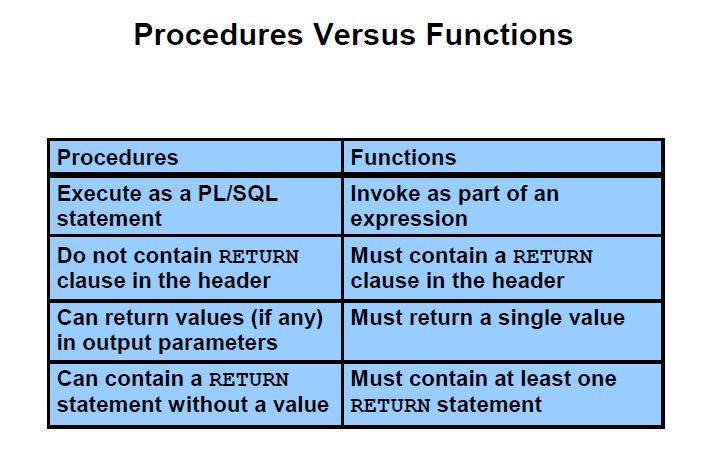
A function in SQL returns a value or a table, based on inputs.
1
2
3
4
5
6
CREATE OR REPLACE FUNCTION get_patient_appointments(p_patient_id INT)
RETURNS TABLE (...) AS $$
BEGIN
  RETURN QUERY SELECT ... FROM Appointment WHERE PatientID = p_patient_id;
END;
$$ LANGUAGE plpgsql;
🛠 Procedures — Do Stuff Without Returning Data
Procedures are like mini-programs. They can validate, insert, update — and even throw errors if something’s off.
1
2
3
4
5
6
7
CREATE OR REPLACE PROCEDURE schedule_appointment(...) AS $$
BEGIN
  -- Check availability
  -- Generate ID
  -- Insert record
END;
$$;
🔀 Triggers — Automatic Reactions
A trigger is SQL’s way of saying “Hey! Something just happened!”
1
2
3
4
5
6
CREATE OR REPLACE FUNCTION notify_new_prescription() RETURNS TRIGGER AS $$
BEGIN
  RAISE NOTICE 'New prescription added: % for patient %', NEW.PrescriptionID, NEW.PatientID;
  RETURN NEW;
END;
$$ LANGUAGE plpgsql;
✨ Fun Fact: Triggers are widely used in banking systems to enforce real-time data integrity.
🔄 Lesson 12: Recursive Queries & Advanced SQL
Recursive Queries — Climb the Data Tree!
Sometimes data connects to itself — like employees under managers, or parts in a product.
1
2
3
4
5
6
WITH RECURSIVE R AS (
  SELECT 1 AS n
  UNION ALL
  SELECT n + 1 FROM R WHERE n < 5
)
SELECT * FROM R;
Transitive Closure — Connect the Dots
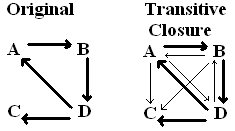
If A leads to B, and B leads to C… then A leads to C. That’s transitive closure. Recursive queries help infer relationships.
🔹 Must follow rules: no aggregates, NOT EXISTS, or EXCEPT in the recursive part.
💡 What I’ve Learned & Why It Matters
This unit transformed SQL from a query tool into a full programming platform. I learned:
- ✅ How computers understand numbers
- ✅ How indexes speed up performance
- ✅ How to protect data with permissions
- ✅ How to automate tasks with procedures and triggers
- ✅ How to write recursive queries for connected data
This is how real-world systems scale — using SQL not just to store data, but to think with it.
🌱 Personal Growth & Reflection
Before this unit, SQL felt like asking the database to hand me stuff. Now, it feels like training a teammate to do work for me.
I feel more confident in:
- Writing clean, optimized queries
- Thinking like a backend engineer
- Debugging logic inside the database
- Automating real-world workflows
It’s not just about knowing SQL syntax anymore — it’s about thinking strategically in data.
😌Conclusion
Unit IV was a huge leap. From writing SELECTs to designing smart, secure, and responsive systems — this unit made me realize that databases aren’t just storage… they’re powerhouses.
They can act, decide, and adapt — and now, so can I. 💪
💼 Fun Fact: The original SQL language was called SEQUEL (Structured English QUEry Language). The name was later shortened to SQL!