Dbs101_unit1
Topic: Database Systems Fundamentals
Data, Database and Database System🗃️
Meaning
Data: Raw facts.
Database: An organized collection of structured data, stored electronically.
DBMS (Database Management System): Software for accessing and managing a database.
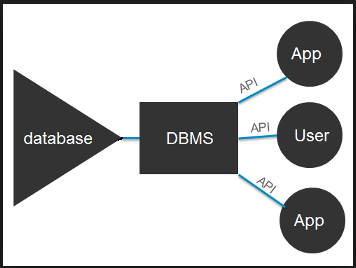
Database System: The combination of a database and a DBMS.
Why database system are needed❔
For instance, old systems of college registration using paper forms and separate spreadsheets are inefficient and prone to errors. Database systems solve these problems.
Problems with File-Processing (Old) Systems❌
Data Redundancy & Inconsistency: Same data stored in multiple places, leading to conflicts.
- Data Access Difficulty: Hard to find specific information.
- Data Isolation: Data scattered across different files, hard to combine.
- Integrity Issues: Difficult to keep data accurate and reliable.
- Atomicity Problems: Trouble ensuring transactions are completed fully or not at all.
- Concurrency Issues: Problems arise when multiple users access data at the same time.
- Security Risks: Hard to protect data.
Advantages of Database Systems☑️
✓ Data Consistency: Ensures data accuracy throughout the database.
✓ Scalability & Flexibility: Handles large datasets and adapts to changes.
✓ Reduced Data Redundancy: Minimizes duplication.
✓ Enhanced Security: Controls data access.
✓ Data Abstraction: Simplifies user interaction with data.
Importance of Database Systems
Database systems are important because they help store, organize, and manage data efficiently. They are crucial in many areas like banking, social media, sales, and navigation. “Data is the new gold.💰”
History/Evolution 📜
- File-Based (1950s-60s) – Simple files, hard to manage.
- Hierarchical & Network (1960s-70s) – Structured like trees/networks, complex but faster.
- Relational (1970s-Present) – Uses tables & SQL, making data management easy.
- NoSQL (2000s-Present) – Handles big data, cloud, and flexible data.
- Modern Databases (Now) – AI-powered, fast, and scalable.
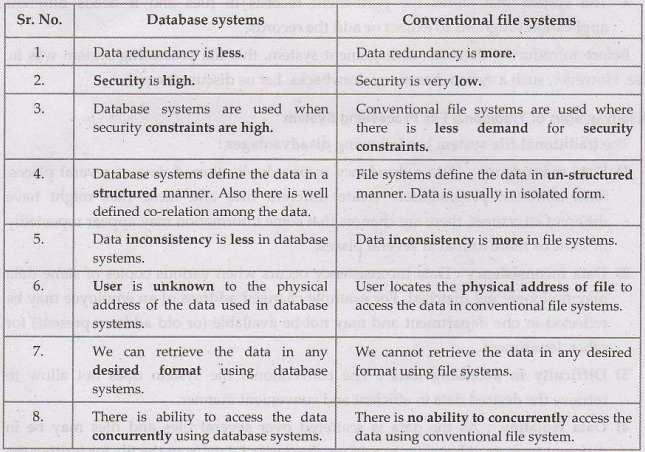
Difference between database and database management system.
View of Data & Data Models📈
- DBMS supports database definition, creation, querying, updating, and administration.
- Data Model: Conceptual tools for describing data, relationships, semantics, and constraints.
- Types of Data Models:
- Entity-Relationship Model
- Semi-structured Data Model
- Object-Based Data Models
- Relational Model
Early DBMS
- Hard to build and maintain.
- Tight logical-physical coupling.
- Queries had to be predefined.
Edgar F. Codd & Relational Model
- Introduced in 1969.
- Separated logical and physical layers.
- Implemented in IBM’s System R in the late 1970s.
- Relational Model: Data stored in tables (relations), with rows (records) and columns (fields).
- Uses SQL for CRUD operations.
Data Abstraction
- Hides complexity from users.
- Levels:
- Physical: Data storage details.
- Logical: Structure and relationships.
- View: User-specific portions of data.
Database Design
- Select data model.
- Develop conceptual design (functional requirements).
- Develop logical design (schema mapping).
- Develop physical design (storage and indexing).
Database Instances & Schemas
- Instance: Current data in the database.
- Schema: Database blueprint (physical/logical).
Database Languages
- DDL: Defines schema.
- DML: Queries and updates data.
Database Engine
- Manages disk storage and CRUD operations.
- Some databases (MySQL, MariaDB) allow engine flexibility; others (Postgres) do not.
Database Engine Components
- Storage Manager: Manages low-level data.
- Query Processor: Interprets and executes queries.
- Transaction Manager: Handles concurrency and recovery.
Database Access from Applications
- Uses APIs to send SQL queries.
- ODBC standard allows database access from C and other languages.
Database Users & Administrators
Database Users
- End Users – Interact with databases via applications (e.g., online banking, e-commerce).
- Application Programmers – Develop software that interacts with the database.
- Database Designers – Define database structure and relationships.
- System Analysts – Determine system requirements and database needs.
- Sophisticated Users – Use query languages like SQL for complex queries.
Database Administrators (DBA)
- Manages Database System – Ensures performance, security, and availability.
- Defines Access Policies – Grants/revokes user permissions.
- Handles Backup & Recovery – Protects data against failures.
- Monitors Performance – Optimizes queries and indexing.
- Ensures Data Integrity – Maintains consistency and security.
What I Learned & Why It Matters🤯
This unit taught me about DBMS, different Data Models, and how the Relational Model uses tables and SQL for managing data. Data Abstraction hleps simplify database use by separating physical, logical, and view levels. I also understood the steps in Database Design, from planning to implementation. Additionally, I learned about different Database Users and Administrators (DBAs) in ensuring security, data integrity, and performance. This knowledge is important for creating efficient databases and managing data effectively.
Personal Growth and Reflection🚀
In this unit, I’ve learned how databases work and why choosing the right data model is important for managing data well. I now understand the basics of relational databases, data abstraction, and the role of DBAs in keeping databases secure and running smoothly. This unit also taught me how good database design affects how well a database performs and keeps data safe. Looking back, I feel more confident in understanding and handling databases, and I’m excited to use this knowledge in my future studies and projects.